


Clogged filter close-up**
If your cordless vacuum isn’t picking up like it used to, the problem is almost certainly fixable — and it’s probably not the motor.
After testing 30+ cordless vacuums over 500+ hours, I’ve seen the same pattern repeatedly: vacuums that “lost suction” were actually suffering from airflow restrictions caused by clogged filters, blockages, or neglected maintenance. In my airflow testing, a heavily clogged filter alone can drop CFM by over 14% — while the motor still sounds completely normal.
This guide walks through every cause I’ve encountered in real testing, ranked from most to least common, with specific fixes for Dyson, Shark, and Tineco models.
The graph below shows airflow on both the lowest and highest power settings.
Quick Answer
The most common reasons a cordless vacuum loses suction are:
- A clogged filter
- Blockages in the wand or nozzle
- A full dustbin
- Hair wrapped around the brushroll
- Battery degradation
- Air leaks or poor seals
1. Clogged Filter (Most Common Cause)

A clogged filter is the single most common cause of suction loss — and the easiest to fix. The filter is the last barrier before air exits the vacuum, so when it clogs, the entire airflow system backs up.
In my testing of the Dyson V12 Detect, a filter that hadn’t been cleaned in 3 years dropped airflow from 58.74 CFM to 50.71 CFM — a 14% reduction at the wand.
In many cases, what feels like “lost suction” is actually lost airflow. A clogged filter doesn’t reduce suction as much as it reduces the volume of air moving through the system — and it’s airflow that carries debris into the bin. Understanding the difference between airflow and suction can help you diagnose whether your vacuum needs a filter clean, a clog removed, or a deeper fix.
Signs your filter is the problem:
- Noticeably weaker pickup despite no visible blockage
- Dusty or musty smell while vacuuming
- Vacuum feels warm, or sounds strained
- Dust is blowing back out rather than being collected
How to Fix a Clogged Filter
- Remove the filter from the vacuum
- Tap it firmly over a trash bin to dislodge loose debris
- If washable: rinse under cold water until the water runs clear
- CRITICAL: Allow to dry completely — minimum 24 hours — before reinserting
- Reinstalling a damp filter can cause mold and damage the motor
🔗 See the full guide: How to Clean a Cordless Vacuum Filter (Step-by-Step)
2. Blocked Wand, Hose, or Nozzle
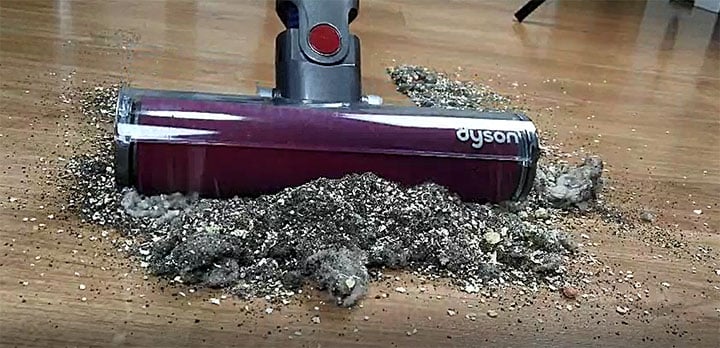
A blockage anywhere in the air path causes an immediate and severe drop in airflow — often more than a clogged filter. In testing, a full wand blockage can drop CFM by 70–80%.
How to Locate the Blockage
- Start at the floor head: detach it and look through the inlet
- Check the wand: hold it up to light and look through
- Check the hose-to-body connection point
- Check the cyclone inlet at the top of the bin
About 80% of blockages occur within 6 inches of the floor head inlet — typically a clump of debris, hair, or a small object sucked in.
3. Full or Overfull Dustbin
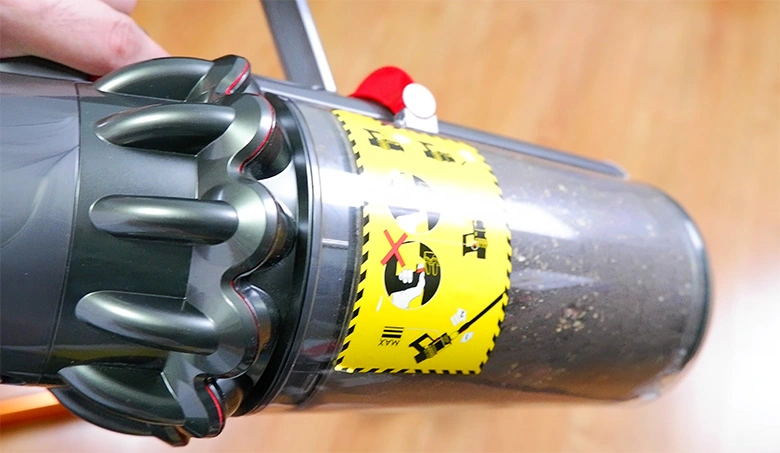
Most people wait until the bin is completely full before emptying — but airflow restriction begins well before that.
Fix:
- Empty the bin regularly
- Don’t wait until it’s completely full
The fix is simple: empty the bin after every session, or at a minimum, when it reaches 50–60% capacity. Most manufacturers recommend this, but bury it in the manual.
4. Hair Wrap on the Brushroll

Hair wrap on brushroll
Hair Wrap vs. Suction Path Blockage
This is a commonly confused issue. There are two different problems that look similar but have different symptoms and fixes:
| Problem | Symptom | Diagnosis | Fix |
|---|---|---|---|
| Brushroll blockage (hair wrap) | Poor carpet agitation, weak debris pickup, normal motor sound | Remove floor head — see hair/thread on roll | Cut and remove hair wrap |
| Suction path blockage | Motor tone changes, visibly weaker pickup of all debris types | Detach wand — look for blockage | Clear blockage in wand/nozzle |
How to Remove Hair Wrap
- Remove the floor head from the vacuum
- Remove the brushroll cover (usually a coin turn or clip release)
- Use scissors to cut through hair along the brushroll length
- Pull hair away in sections — don’t yank
- Check the end caps where hair collects around the bearings
- Spin the roll manually to confirm it rotates freely
Fix:
👉 Remove hair manually (see: How to Remove Hair Wrap from a Brushroll)
5. Air Leaks at Connections and Seals
A loose connection or worn seal creates a “short circuit” in the airflow path — air escapes before it can carry debris through the system, reducing effective suction at the floor head.
How to Diagnose an Air Leak
- Run the vacuum at normal power
- Pass a lit incense stick or smoke pen slowly along each connection joint
- Disrupted or deflected smoke indicates an air leak at that seam
- Key areas to check: floor head/wand joint, wand/body joint, bin lid seal, post-motor filter cover
Fix:
- Ensure each connection clicks firmly into place
- Inspect rubber seals for cracks or deformation — replace if damaged
- On Dyson V-series: check the red bin release mechanism — a partially open bin causes significant seal loss
6. Battery Degradation
As a lithium-ion battery degrades, it delivers less peak voltage to the motor — especially under load. This reduces impeller speed and directly lowers airflow.
How to Identify Battery vs. Other Causes
- Max/Boost mode feels noticeably weaker than it used to
- Eco mode still seems relatively normal
- Runtime has shortened significantly (below 70% of the original spec)
- Performance drops off sharply within the first 2–3 minutes of use
Real long-term data: Dyson V15 Detect after 5 years
I’ve had my Dyson V15 Detect for five years now, which gives me something most reviewers can’t offer — actual long-term battery data from the same unit.
The surprising finding: max-mode airflow barely changed. After five years, the V15 measured 74 CFM in Max mode — essentially identical to the 73 CFM I recorded when it was new. But there’s an important caveat: I rarely use Max mode. It only comes out when I need to deep clean the carpet surface I use for testing other vacuums. That light usage pattern is almost certainly why the motor and battery still deliver full power under peak load.
| Mode | Brand new | After 5 years | Runtime loss |
|---|---|---|---|
| Eco (hard floor) | 84 min 19 sec | 80 min 30 sec | −3 min 49 sec (4.5%) |
| Auto (carpet) | 56 min 58 sec | 52 min 40 sec | −4 min 18 sec (7.5%) |
The percentage drop is more noticeable on carpet because the vacuum draws more power on that surface — a degraded battery loses capacity faster under heavier load. That said, a ~5% runtime loss over five years with light Max-mode use is excellent by lithium-ion standards.
The takeaway for your vacuum: If you use Max or Boost mode frequently — especially on carpet — expect faster battery wear. Heavy Max-mode users may see meaningful degradation within 18–24 months, while lighter users can get 3–5 years before runtime drops become noticeable.
Replacement Battery Options by Brand
- Dyson V-series: replacement batteries are widely available on Amazon (~$30–50 for third-party, ~$70+ OEM)
- Shark IZ-series: replacement batteries available through Shark directly or Amazon
- Tineco: replacement batteries available through Tineco’s website
- If replacement batteries aren’t available or cost more than the vacuum is worth — see the upgrade section below
7. Wrong Floor Head for the Surface
Using the wrong attachment doesn’t cause actual suction loss — but it makes the vacuum perform as if it has. The seal between the floor head and the surface is what creates effective pickup.
| Floor type | Best floor head | Why |
|---|---|---|
| Hard floors (tile, hardwood, LVP) | Soft roller / fluffy attachment | Gentle on surface, seals tightly to floor |
| Low-pile carpet | Standard brushroll | Agitates fibers, stronger seal |
| High-pile / thick carpet | Motorized brushroll with height adjustment | Needs to penetrate pile without sealing off |
| Mixed floors | Multi-surface brushroll | Compromise between both |
🔗 See: Soft Roller vs Brushroll — Which Attachment to Use and When
What My Testing Data Shows
From real-world testing:
Airflow—not just suction—is what moves debris through the vacuum. Even small blockages or clogged filters can significantly reduce airflow, leading to noticeable performance loss.
This is why a vacuum can still “sound powerful” but clean poorly.
Step-by-Step Diagnosis Flow
Work through these in order — most people find the fix within the first three steps:
- Empty the dustbin completely
- Remove, clean, and let the filter dry (if you vacuumed recently, this alone often solves it)
- Detach all components and check each one for blockages
- Inspect and clear the brushroll of hair/thread
- Check all connection points and seals (fog test if needed)
- If performance is still weak: run on max mode briefly and note if it drops off quickly (battery issue)
Steps 1–3 alone resolve roughly 80% of suction-loss complaints in my testing experience.
Model-Specific Quick Fix Guide
Common symptoms and likely causes organized by the most popular cordless vacuum brands.
Dyson V-series (V8, V10, V11, V15 Detect)
| Symptom | Most likely cause | Quick fix |
|---|---|---|
| Pulsing on/off repeatedly | Blockage or clogged filter triggering thermal protection | Check wand/cyclone for blockage; clean filter |
| Red filter indicator light | Clogged HEPA or pre-motor filter | Clean both filters; dry 24 hrs before reinserting |
| Weak in Max mode only | Battery degradation | Test in Eco — if normal, battery is the issue |
| Loud rattling noise + weak suction | Object lodged in cyclone | Remove bin and clear cyclone inlet with pencil |
| Good suction at wand, weak at floor | Brushroll blockage or wrong attachment | Check brushroll for hair; switch to correct head |
| Bin release feels loose | Bin seal not fully closed | Press bin firmly until it clicks; check red latch |
Shark IZ-series (IZ140, IZ162H, IZ362H, IZ682H)
| Symptom | Most likely cause | Quick fix |
|---|---|---|
| Suction weak from startup | Clogged foam + felt filter combo | Clean both filters; the foam pre-filter clogs faster |
| Brushroll indicator light flashing | Hair jam on brushroll | Remove brushroll (tool-free on most IZ models); clear hair |
| Strong suction at wand, weak at nozzle | DuoClean soft roller clogged | Remove and rinse soft roller; check for debris under front roller |
| Short runtime + weak performance | Battery degradation | Replace battery — Shark sells direct; 2–3yr lifespan typical |
| Clicking noise + suction loss | Hard debris lodged in brushroll housing | Inspect housing for coins, clips, or hard debris |
Tineco (A10, A11, Floor ONE S3/S5/S7)
| Symptom | Most likely cause | Quick fix |
|---|---|---|
| iLoop sensor always showing red | Clogged filter or sensor itself dirty | Clean filter AND wipe iLoop sensor window with damp cloth |
| Auto mode not responding to dirt | iLoop sensor blocked or filter clogged | Same as above — the sensor drives auto power adjustment |
| Weak suction + app showing low battery health | Battery degradation | Replace via Tineco website — 18–24 month lifespan on heavy use |
| Floor ONE: weak pickup after roller cleaning | Roller not fully seated after reinstall | Ensure roller clicks into both end caps before use |
When It’s Not Fixable — Time to Upgrade
If you’ve worked through every step above and suction is still significantly weak, the issue is likely internal:
- Motor failure — usually accompanied by a change in pitch or complete motor cutoff
- Severe battery degradation, where replacement batteries cost more than the vacuum’s value
- Cracked internal housing or cyclone damage affecting airflow geometry
- Impeller damage from debris ingestion
A quick way to test for motor failure: measure airflow at the motor inlet (or body air outlet) with all attachments removed. If CFM is drastically lower than spec, even with a clean filter, the motor is the issue.
If your vacuum still struggles after all fixes, it may be time to upgrade.
Related Guides
- How to clean a cordless vacuum filter
- How to remove hair wrap from a brushroll
- What matters for carpet cleaning
Final Thoughts
In over 500 hours of vacuum testing, the same pattern comes up again and again: a vacuum that “lost suction” was almost always suffering from a simple maintenance issue — not hardware failure.
Clean the filter, clear the blockages, empty the bin — those three steps alone solve the problem the vast majority of the time.
If you’ve done all of that and your vacuum still struggles, the model-specific tables and battery notes above will point you to the likely culprit.
If the vacuum genuinely needs replacing, the upgrade guide is linked above.
Frequently Asked Questions
Why did my Dyson suddenly lose suction?
On Dyson V-series models, a sudden pulsing or complete loss is almost always a blockage in the wand or cyclone inlet, or a clogged filter triggering the thermal protection cutoff. Check the wand first (hold it to light and look through), then clean both filters and allow them to dry fully before reinserting.
Can a dirty filter really cause that much suction loss?
Yes — more than most people expect. In testing, a heavily clogged filter can drop airflow by over 50%. Because the vacuum still sounds normal (the motor is still running at full speed against the restriction), many people don’t suspect the filter. But the air — and the debris — simply isn’t moving through the system efficiently.
Why is my vacuum still weak after cleaning the filter?
Work through the remaining causes: check for blockages in the wand and nozzle (they’re often the culprit when filter cleaning doesn’t help), inspect the brushroll for hair wrap, and check that all connections are firmly seated. If all of those are clear, run a quick battery test by comparing Eco mode vs Max mode performance — if Eco seems okay but Max is weak, battery degradation is likely.
Does battery degradation actually affect suction?
Yes, directly. The motor impeller speed — and therefore airflow — is dependent on the power the battery delivers. A degraded battery at 70% capacity typically reduces max-mode airflow by 15–25%. This is most noticeable in Boost/Max mode; Eco mode is less affected because its lower power demand is within what the degraded battery can still supply.
Why does my vacuum sound powerful but not pick up well?
This is the classic sign of an airflow restriction — usually a clogged filter or partial blockage. The motor is working hard (hence the noise), but the restricted airflow means debris isn’t being transported effectively through the system. Clean the filter and check for blockages first.